
How to use FestMates: plan, map and crew
Published · 7 min read
FestMates is a free festival planner for iPhone and Android. You find your festival, star the acts you want to see, and the app turns that into a day plan with reminders, a map and a way to find your friends on site. You don't need an account for any of it.
1. Find your festival
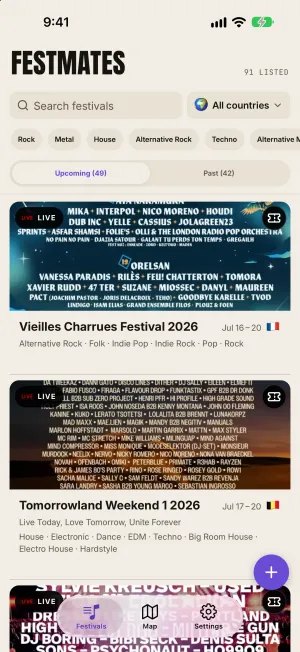
Open the Festivals tab. You see upcoming festivals with their dates and line-ups, and you can search by name or filter by country and genre. The same list lives on this website under all festivals, so you can look around before you install.
Tap a festival to open it. Tap I'm going and the app keeps that festival ready on your phone, so it is there when the signal on site isn't.
Your festival is not in the list? You can add it yourself in a few minutes. The guide add any festival to FestMates shows how.
2. Star acts and build your day plan
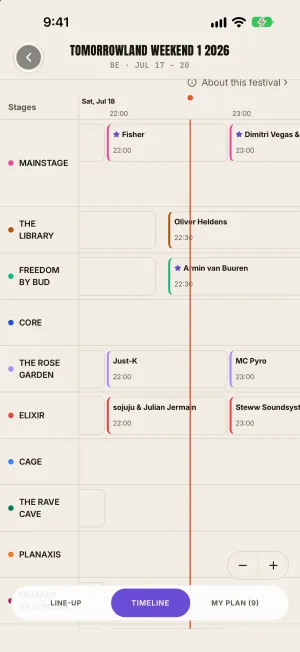
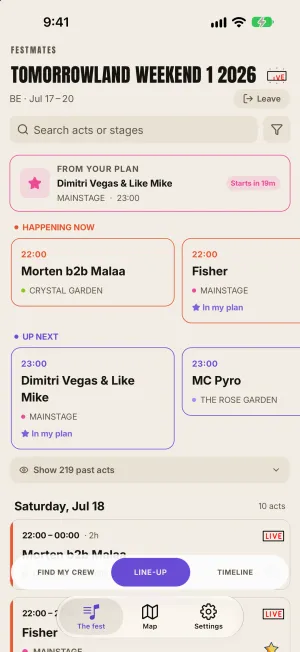
Inside a festival you find the line-up by day and stage, and the timetable with every stage side by side. Search for an act or a stage, or filter the list. Tap an act for its set time, stage and a short artist bio.
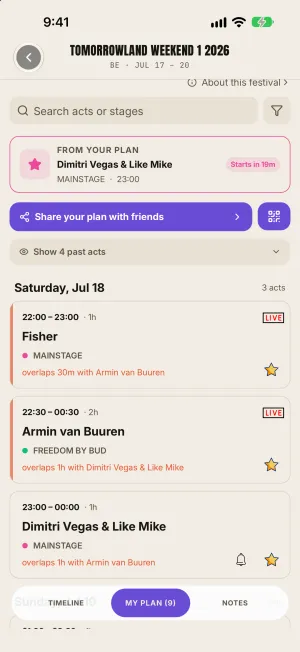
Tap the star on any act you don't want to miss. Every starred act lands in My plan, sorted by day and time. That plan is yours alone and stays on your phone.
3. See clashes before they happen
Two of your acts play at the same time? Your plan says so right on the set, for example "overlaps 1h 15m with" and the name of the other act. You see how long the sets overlap and can pick one at home, not in the crowd.
4. Get a reminder before each set
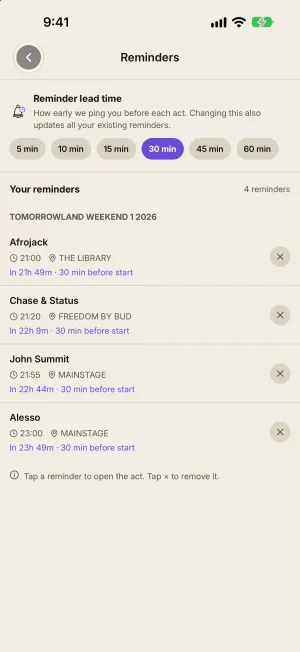
Tap Remind me on an act and the app pings you before it starts. Pick how early in the settings, from 5 to 60 minutes. Change it once and all your reminders follow. Reminders work without internet, because the phone schedules them itself.
5. Find stages, toilets and water on the map
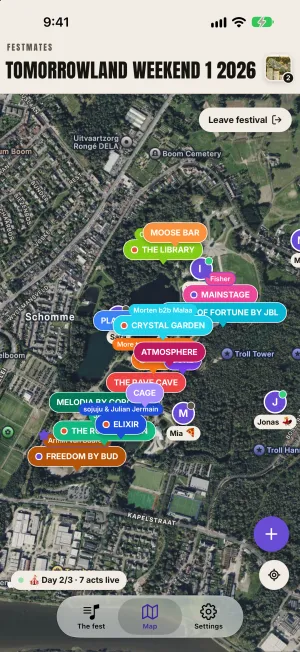
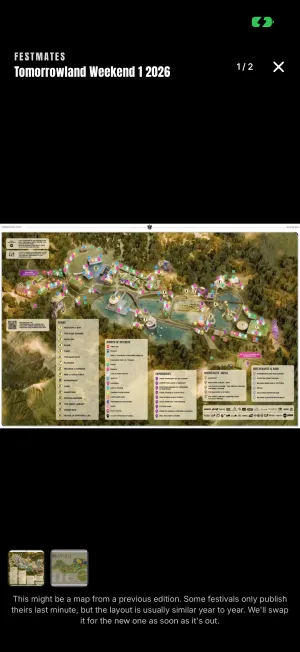
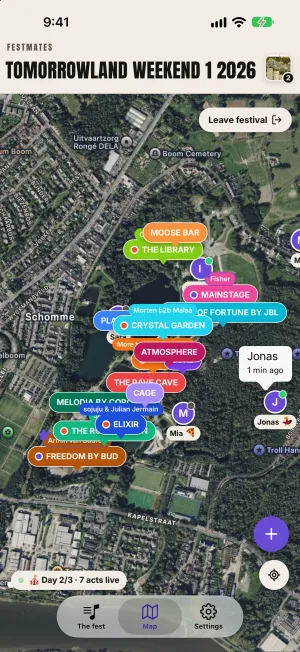
The festival map shows every stage and the facilities the festival lists, like toilets, water, food, first aid and info points. Tap a facility chip and the map flies there. When the organizer has published a site map, you can open it in the app as well.
Drop your own pins too. Add my tent marks your tent, and Add custom pin saves anything else, like a meeting point or the food truck you liked. Tap Directions to find your way back.
6. Use it offline on the grounds
Signal on festival sites is often bad. Once a festival is downloaded to your phone, the line-up, your plan, the map and your reminders work without a connection. Live crew locations, weather and schedule updates need signal.
When you arrive, tap I'm here, then Let's go, to start festival mode. The Festivals tab then shows just this festival: what is playing now, what is up next, and the on-site map with stages, facilities and your saved acts. Leave whenever you like. Your plan, pins and notes stay saved.
7. Share your plan and your pins
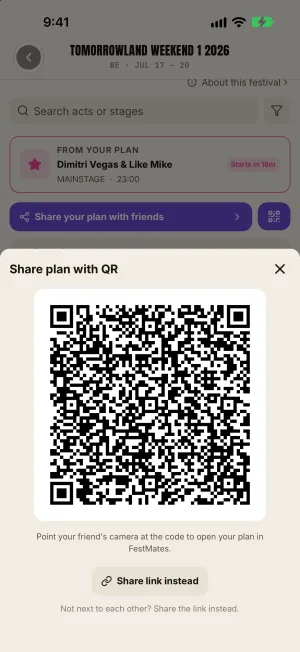
Tap Share plan to send your day plan to friends as a link or a QR code. They open it in FestMates and add the acts they like to their own plan. Without the app, the link shows your plan on this website.
Pins work the same way. Share one pin, or select several (your tent, the meeting point, the bar) and send them together.
8. Find your crew on site
Open Find my crew, start a group and invite your friends with a link or a QR code. You approve who joins. Everyone who turns sharing on shows up as a pin on the festival map, and you show up on theirs.
- Your crew sees the name you chose. Your location stays private until you turn sharing on.
- Locations are end-to-end encrypted, so only your group can read them. We can't see them either.
- It works while the app is open. The app never tracks you in the background.
- Groups and everything shared in them delete themselves 72 hours after the festival ends.
A few more things worth knowing
- A festival checklist helps you pack, with tips for each item.
- The weather for the festival days sits on the festival page.
- Write a note on any act, for that song you want to look up later.
- After the festival, a recap plays your weekend back as a timelapse.
- The app speaks English, German, Spanish, French and Italian.
Questions
Is FestMates free?
Yes. The app is free to download and use, with no in-app purchases and no ads today.
Do I need an account?
No. Your plan, reminders, notes and pins are stored on your phone. For crew groups you pick a name your friends will see, and that is all.
Does FestMates work without signal?
Yes. Once a festival is on your phone, the line-up, your plan, the map and your reminders work offline. Tap I'm going on a festival and the app keeps it ready for the weekend.
Can I plan with friends who use a different phone?
Yes. FestMates runs on iPhone and Android, and shared plans, pins and crew groups work across both.
Something missing or not working the way you expect? Tell us through the contact form.
Get FestMates
Free for iPhone and Android. No account needed.


Keep reading
Add any festival to FestMates in a few clicks
Your festival isn't in FestMates yet? Add it yourself from its line-up or timetable and plan as usual. Running the festival? Set it up for free with the organizer tool.
FestMates and other festival apps compared
Branded festival apps, multi-festival apps, spreadsheets and paper timetables: what each option offers goers and organizers, and where FestMates fits.